Connected
Every one of them speaks something the others understand.
A sensor, a limit switch, a thermocouple, a camera, an oscilloscope, a data logger, a PLC - if it produces a number, one of these applications can read it. And whatever reads it re-serves the same value as Modbus TCP, OPC UA, MQTT or SCPI, so the next machine along can have it too. The link between them is an ordinary socket, which means the next machine can be on the same bench or on another continent.

The matrix
What each one speaks, in and out.
in means it only reads that protocol. both means it reads and writes — it can send to your device, not just poll it — and where a port number is given, it also listens on that port so your own tooling can drive it. out means it serves only.
| Application | Serial | TCP | Modbus | OPC UA | MQTT | SCPI | CAN | HTTP |
|---|---|---|---|---|---|---|---|---|
| MBLT PLC | both | both | both 1502 | out 4840 | out | both 5025 | both | in |
| MBLT HMI | both | both | both 1503 | both 4841 | both | - | - | in |
| HardwareRTD | both | both 5200 | both | - | - | both | in | - |
| SignalScope | both | both 5211 | both | - | - | both 5025 | in | - |
| DataStreamerX | both | both | both | - | - | both | both | - |
| AOI Inspector | both | both 5025 | - | - | - | both 5025 | - | out 5026 |
| MB Lab Vision | both | both 5027 | - | - | - | both 5027 | - | out 5028 |
| MBLT Sequencer | both | both 5240 | both | - | - | both 5241 | - | out 5240 |
both in the Serial column means the application reads serial devices and answers SCPI on a serial line - so a terminal, a USB-serial cable and no network at all is enough to drive it. MBLT Sequencer reads and writes on serial, Modbus and SCPI, because a test sets an instrument up before it measures anything. It answers SCPI itself on 5241 and serves its own page and client API on 5240 — a test station that is also a bench instrument, so a PLC or a LabVIEW program can start a test and read the verdict. It reaches OPC UA and MQTT only through MBLT PLC and MBLT HMI, which is why those two columns are dashes rather than ticks. MBLT HMI has no CAN driver of its own, but reads CAN channels through a HardwareRTD or DataStreamerX connection, which is why that row shows a dash rather than a tick.
Node-RED, Node.js and anything else that speaks it
The protocols are standard, so the other end does not have to be mine.
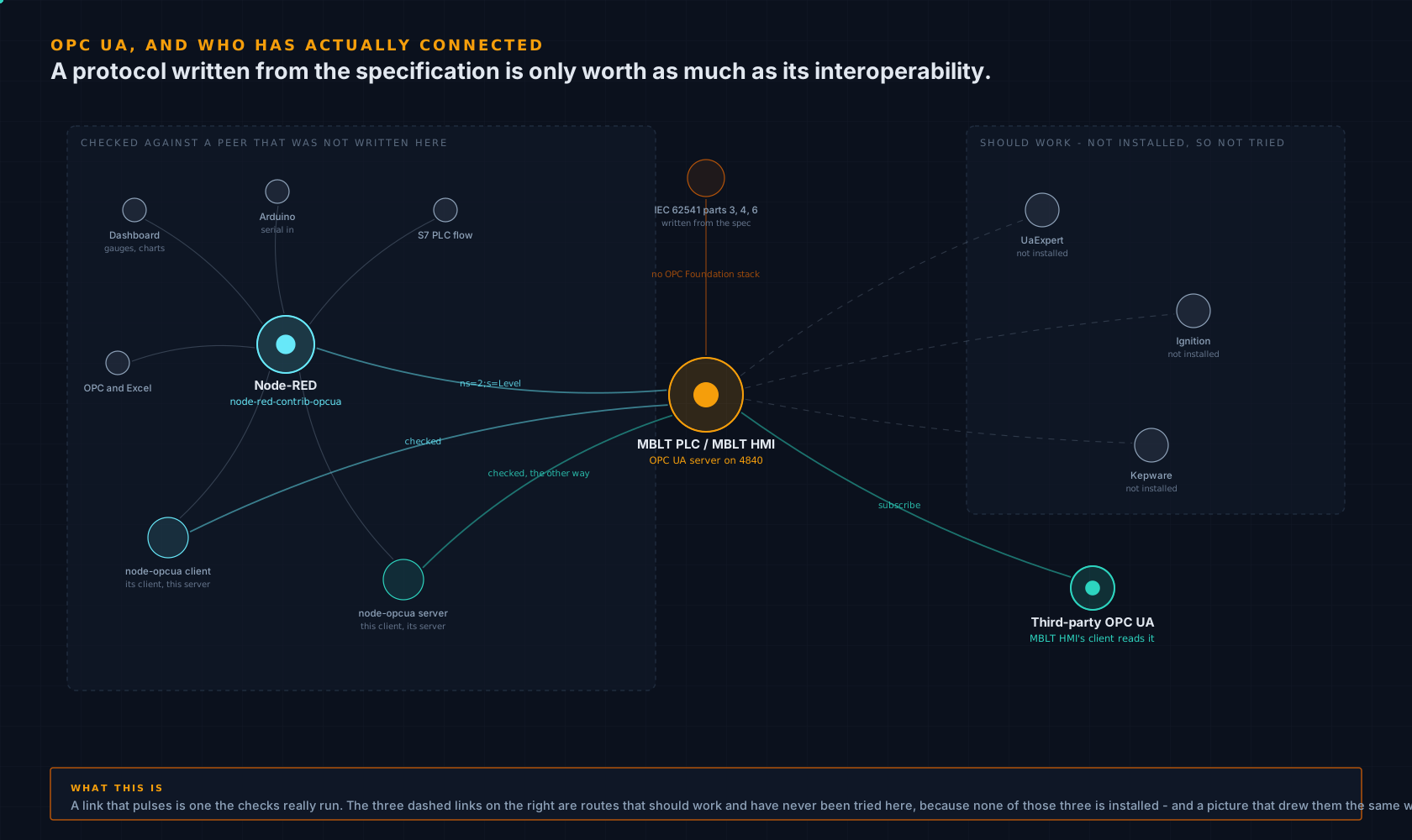
MBLT PLC and MBLT HMI serve OPC UA on 4840, and that server is written here from the specification — IEC 62541 parts 3, 4 and 6 — rather than wrapped around somebody else's stack. There is no OPC Foundation library and no third-party package behind it. Which raises the obvious question about a protocol implementation written from scratch: does it actually interoperate?
Checked against Node-RED's own OPC UA library
node-opcua 2.186 is the library inside
node-red-contrib-opcua, and it is somebody else's
reading of the same specification. The checks run it in
both directions: its client against this server, and
this client against its server. A client and a server that share
one codec will agree with each other even where both are wrong,
which is the whole reason for testing against a peer that was
not written here.
Connecting Node-RED to it
Add an OPC UA node, endpoint opc.tcp://<pc>:4840,
security policy None and mode None, and read an item such as
ns=2;s=Level. From there it is an ordinary Node-RED
flow — a dashboard gauge, a chart, a function node, a file
write, an HTTP endpoint, or a serial port to an Arduino on the
same bench.
Node.js against the simulated controllers
The PLC simulations that ship with HardwareRTD speak their controllers' real protocols, so the clients people actually use can talk to them. nodes7 reads and writes the Siemens S7 simulator, alongside python-snap7; pylogix and pycomm3 read and write the Allen-Bradley one, and pymodbus the OpenPLC one.
And what has not been checked
UaExpert, Ignition and Kepware should all connect — the settings for each are written down — but none of them is installed here, so none of them has been tested, and this page will not pretend otherwise. If you run one of them and it works, or it does not, that is worth an email either way.
The same holds in the other direction: MBLT HMI's OPC UA client reads third-party servers, so a tag on somebody else's SCADA is just another tag on the screen.
A worked chain
One switch, six places it ends up.
-
1
A limit switch closes
on a machine in another building. It is wired to a digital input on an ESP32-S3 running a ladder program.
-
2
MBLT PLC publishes it
as a tag. The same value is available on Modbus TCP 1502, OPC UA 4840, MQTT and the MB Lab stream on 5221 - four protocols, one program, no extra code.
-
3
MBLT HMI picks it up
over any of those, raises an alarm with a deadband and a delay, logs it to SQL Server behind a disk queue, and shows it on a panel PC and in a browser at the same time.
-
4
HardwareRTD takes the same tag
over Modbus, and puts it in an Excel cell as a real number - so the sheet that already does the maths keeps doing it, live.
-
5
SignalScope plots it
beside an analogue channel from a sound card and a CAN bus decoded against a DBC, on the same timebase.
-
6
The dispatcher runs the analysis
across the whole project afterwards and merges every application's tasks into one Microsoft Project plan.
The scope of it
Now do that on every machine you have.
One switch reaching six destinations is the small version. Because the link is a standard protocol over an ordinary socket, there is no natural limit to how many machines join in — a bench here, a line at a contract manufacturer, a chamber at a lab you do not own, an office two time zones away. Each one both consumes what the others publish and publishes what it measures.

And then keep going
Nothing about this gets harder with distance or with number.
The six sites above are a corner. A protocol that works between two machines works between two hundred, because each one only ever talks to the next — there is no central thing to outgrow, no broker to size, and nothing counting endpoints. Watch the frame pull back.

Worth saying plainly
Capable is not the same as advisable.
All of this will cross the public internet, because TCP does. That does not mean it should. A bench that can be reached from anywhere can be reached by anyone who finds it, and none of these protocols was designed with that in mind - Modbus and raw streams have no authentication at all.
Put it on a VPN or a private link. Where a remote connection is genuinely needed, prefer the ones that are read-only: HardwareRTD's engine serves values to another PC and throws away anything that comes back, deliberately, because a formula on another machine should not be able to move a drive.
What this is not
No cloud, no account, no broker you have to rent.
There is no MB Lab server in the middle of any of this. The applications talk to each other directly over your own network, with your own addresses. Nothing phones home and nothing needs an internet connection, which is the only reason any of it works on a shop-floor machine that has never been online.
Take it with you
The same argument, as a deck.
Ten slides covering the rule, the protocol matrix, a worked chain from one limit switch to six destinations, how far it reaches, and where the sensible limits are. Speaker notes included.