Software — SignalScope

SignalScope

An oscilloscope for anything that can send numbers.

Available 1.0.0 SignalScope — command line and desktop app

What it does

A serial port, a TCP socket, a Modbus PLC over TCP or RTU, a CAN bus, a sound card, an SCPI instrument, the HardwareRTD engine or a CSV file - if it produces numbers, it can be plotted. It draws straight onto a canvas every frame rather than making a DOM node per point, and adds what a scope needs on top of that. It is also an SCPI instrument itself, so a test sequence can drive it the same way.

  • Trigger on rising, falling, either, or a pulse wider or narrower than a time - plus trigger on a decoded packet containing text or matching a regular expression
  • Cursors, markers, measurements, persistence, and min/max drawing when there are more samples than pixels
  • Math channels, an FFT with THD, SNR, SINAD and ENOB, and a vector network analyser with short/open/load calibration
  • Protocol decoders - UART, I2C, SPI, CAN against a DBC, SENT and PWM - decoded on top of the traces and as a table
  • Modes a bench scope has: XY, split panes, stacked sum, averaged sweeps, envelope, stored segments, reference traces, and limit and mask tests that count passes and failures
  • A signal generator out of the sound card - sine, square, triangle, sawtooth, PWM, noise and sweeps, in bursts or continuous, plotted as its own channel so a Bode plot works
  • Random vibration against a standard profile, with the measured PSD checked against its tolerance band
  • Reads other tools' captures - sigrok and PulseView, Saleae Logic 2, Rigol, Keysight, Tektronix, Siglent and LeCroy CSV exports - and raw binary, any width, either endian
  • A configurable time base, because arrival time is wrong by milliseconds when USB delivers rows in bursts
  • It answers SCPI itself - on TCP 5025 and on a serial line - so a sequencer drives the scope as an instrument, and a read-only share stream on 5211 that any other tool reads as an ordinary TCP device
  • A recorder that streams to disk, and the same page in its own window, a browser tab, or an Excel sheet
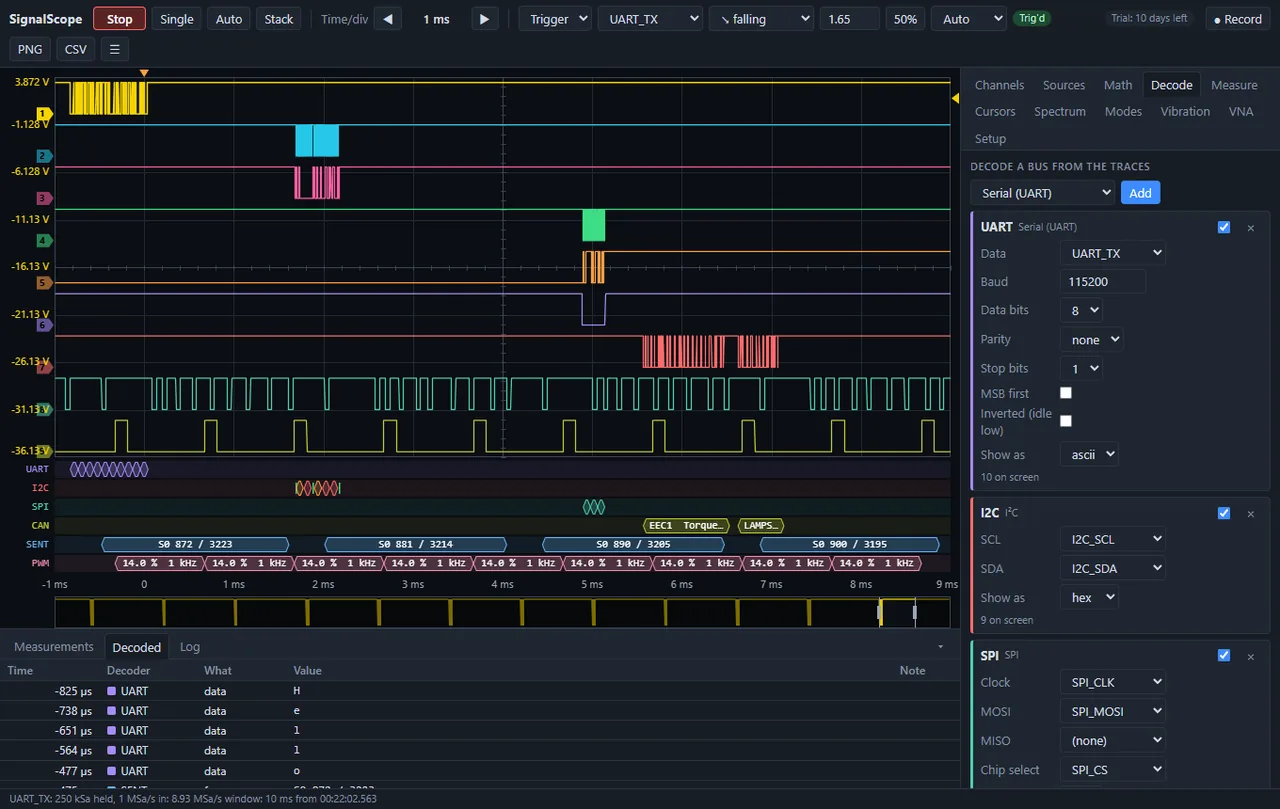
Nine traces with six buses decoded underneath them at once - UART, I2C, SPI, CAN against a DBC, SENT and PWM. The UART is set to 115200 8-N-1 and shown as ascii, and the decoded table is spelling out H, e, l, l, o. The trigger is on UART_TX falling at 1.65 V; the status line reports 250 kSa held at 1 MSa/s in a 10 ms window.
Cursors and measurements on four channels at once. The two time cursors give the interval and its reciprocal straight away - 33.3 ms, 30 Hz - and the value of every channel at each one and the difference between them. The table underneath tracks frequency, peak-peak, RMS, duty cycle and rise time continuously, with the mean, minimum and maximum beside the live figure rather than only the instant you happened to look.
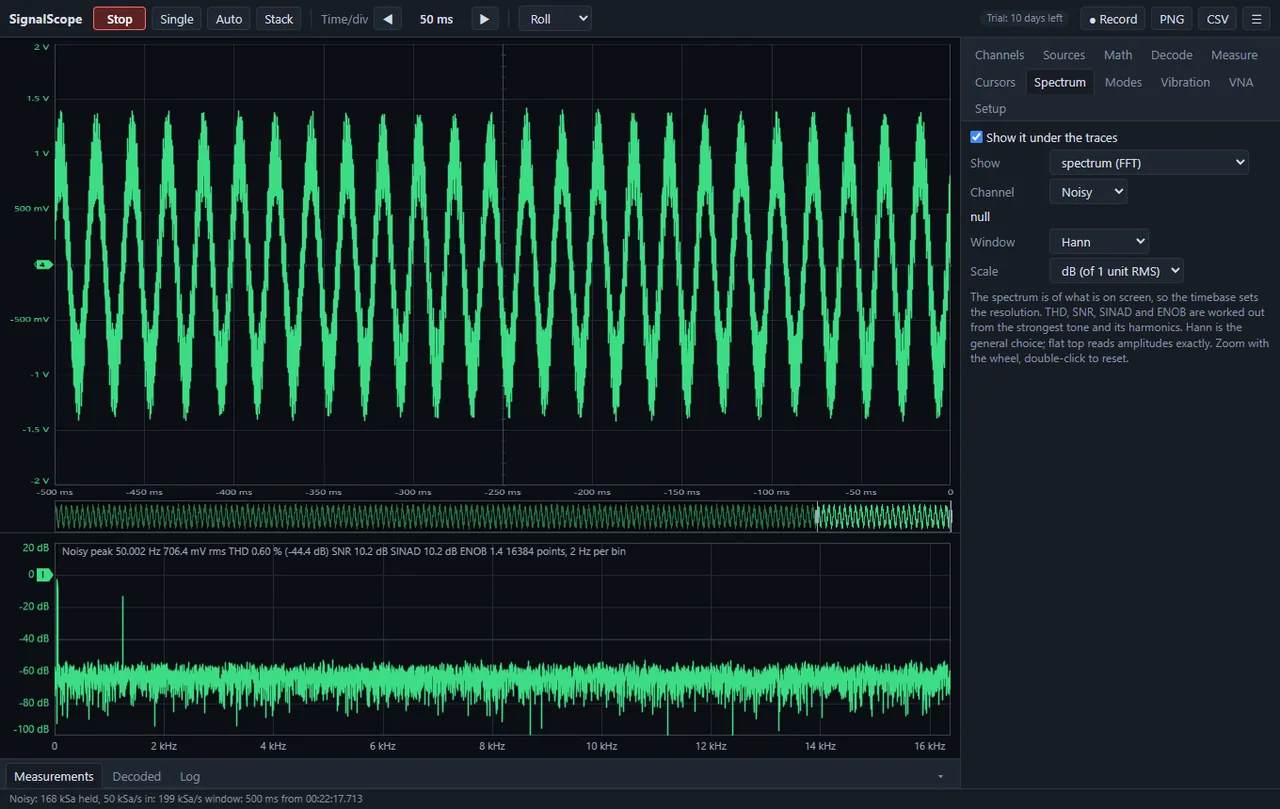
An FFT drawn under the traces, of whatever is currently on screen - so the timebase sets the resolution, here 16384 points at 2 Hz a bin. The readout is the part that matters on a bench: peak at 50.002 Hz, 706.4 mV rms, and THD, SNR, SINAD and ENOB worked out from the strongest tone and its harmonics. Hann by default, flat top when the amplitude has to be exact.
Random vibration run against a standard profile. The accelerometer is scaled in mV/g, the test is NAVMAT P-9492 at 6.06 Grms, and the breakpoints are typed as frequency and g2/Hz. The measured PSD in cyan sits inside the +-3 dB tolerance band in orange, and the verdict is written out: 6.04 Grms against 6.06 asked, 100 % of the band within tolerance, worst -1.5 dB at 2 kHz. Peak, RMS, crest factor and kurtosis are tracked alongside.
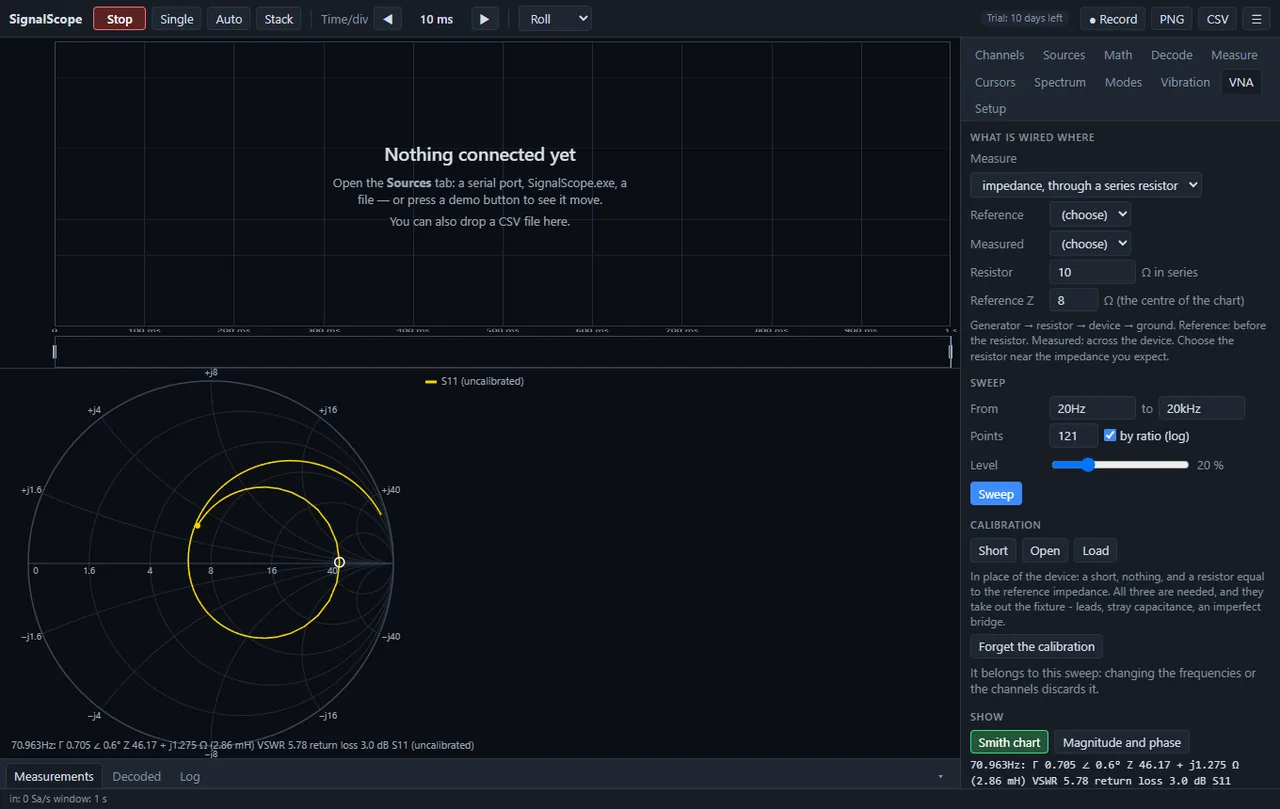
A vector network analyser across the audio band, built from a sound card and a series resistor. It sweeps 20 Hz to 20 kHz logarithmically and draws S11 on a Smith chart, reading out gamma, complex impedance, the equivalent inductance, VSWR and return loss at the cursor. Short, open and load calibration takes out the fixture itself - the leads, stray capacitance and an imperfect bridge - and the trace stays labelled uncalibrated until you have done it.
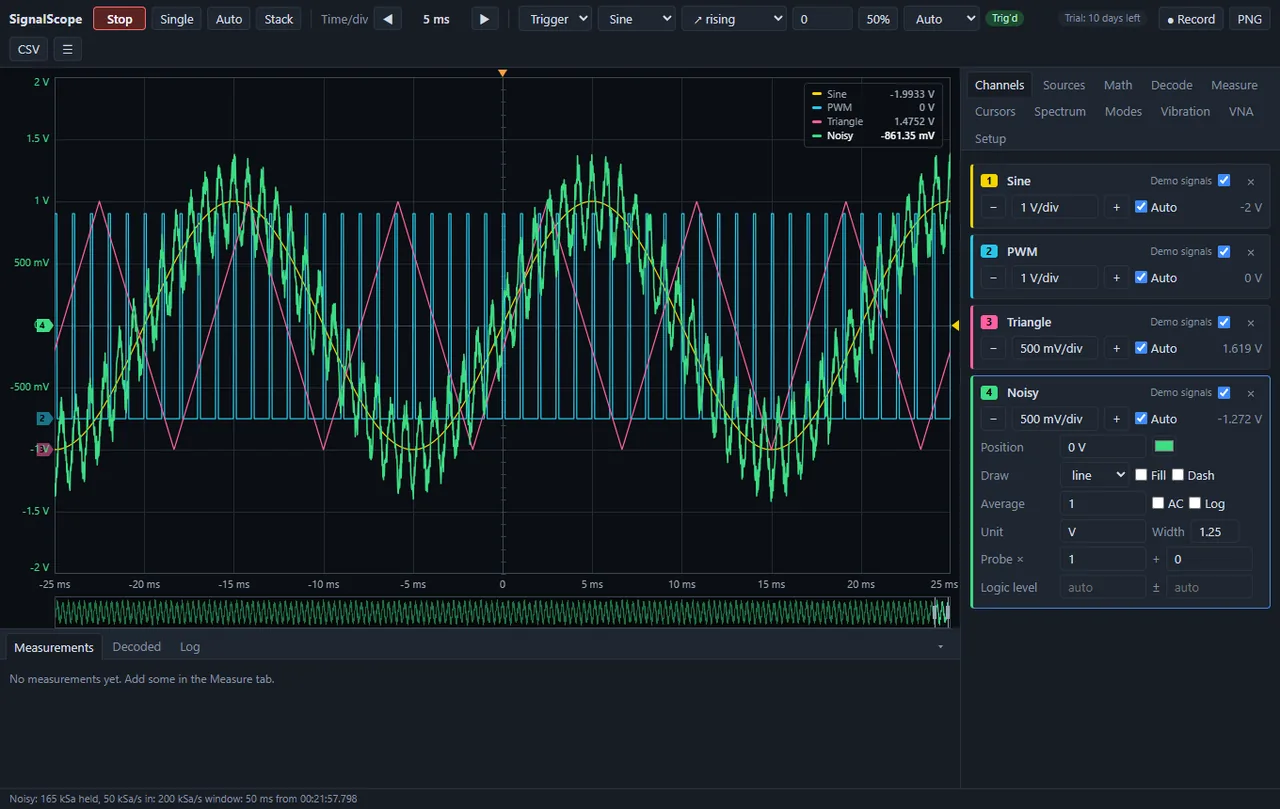
Four channels running, each with its own controls: volts per division with an Auto tick, vertical position, line or filled or dashed drawing, averaging, AC coupling, a log axis, a unit, a trace width, a probe factor and a logic threshold. The status line underneath is the honest part - 165 kSa held, 50 kSa/s in, 201 kSa/s out, a 50 ms window - because a scope that will not tell you its real sample rate is hiding something.
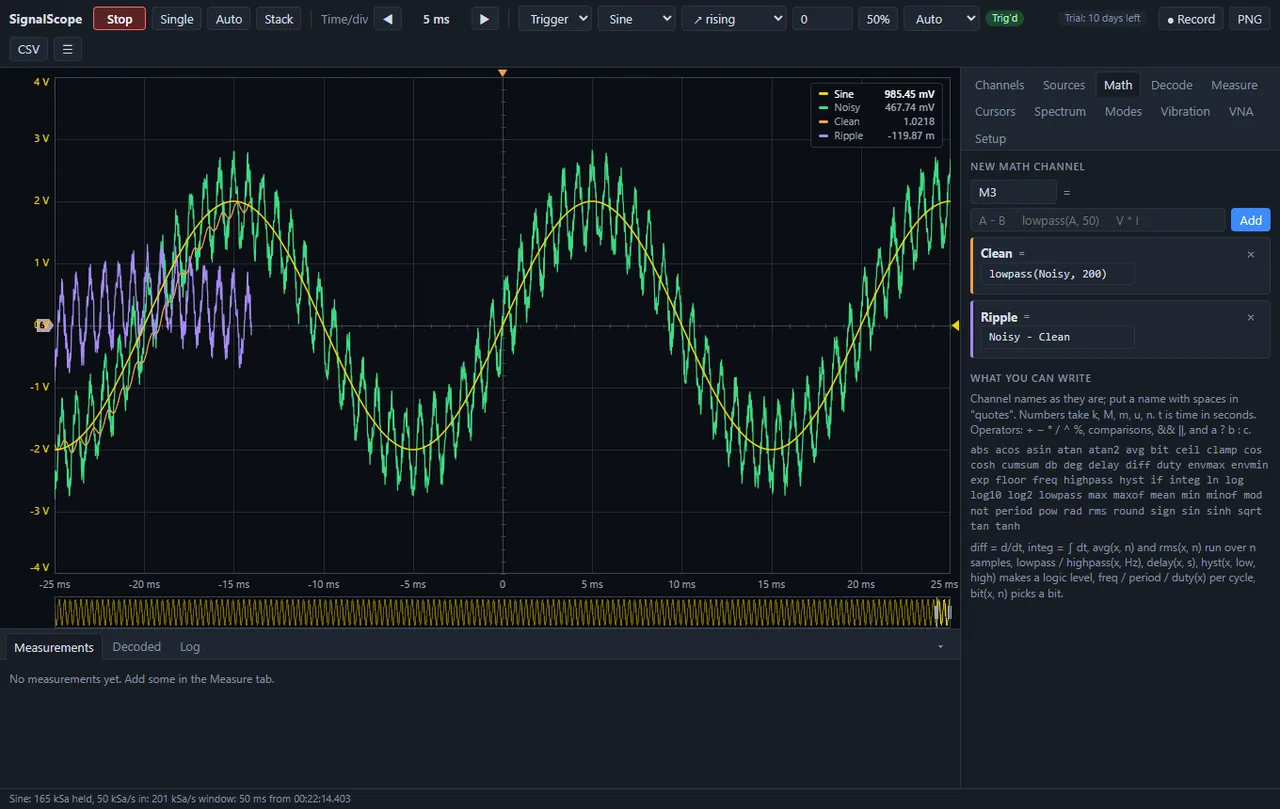
Two maths channels doing one job: Clean is lowpass(Noisy, 200) and Ripple is Noisy - Clean, so the smooth part and the hash on top become separate traces you can measure. The whole function list is on the right, and it is the list a bench actually needs - diff and integ, rms and avg over a window, lowpass and highpass by frequency, delay in seconds, hyst to turn an analog trace into a logic level, freq and period and duty per cycle, and bit to pick one bit out of a bus.
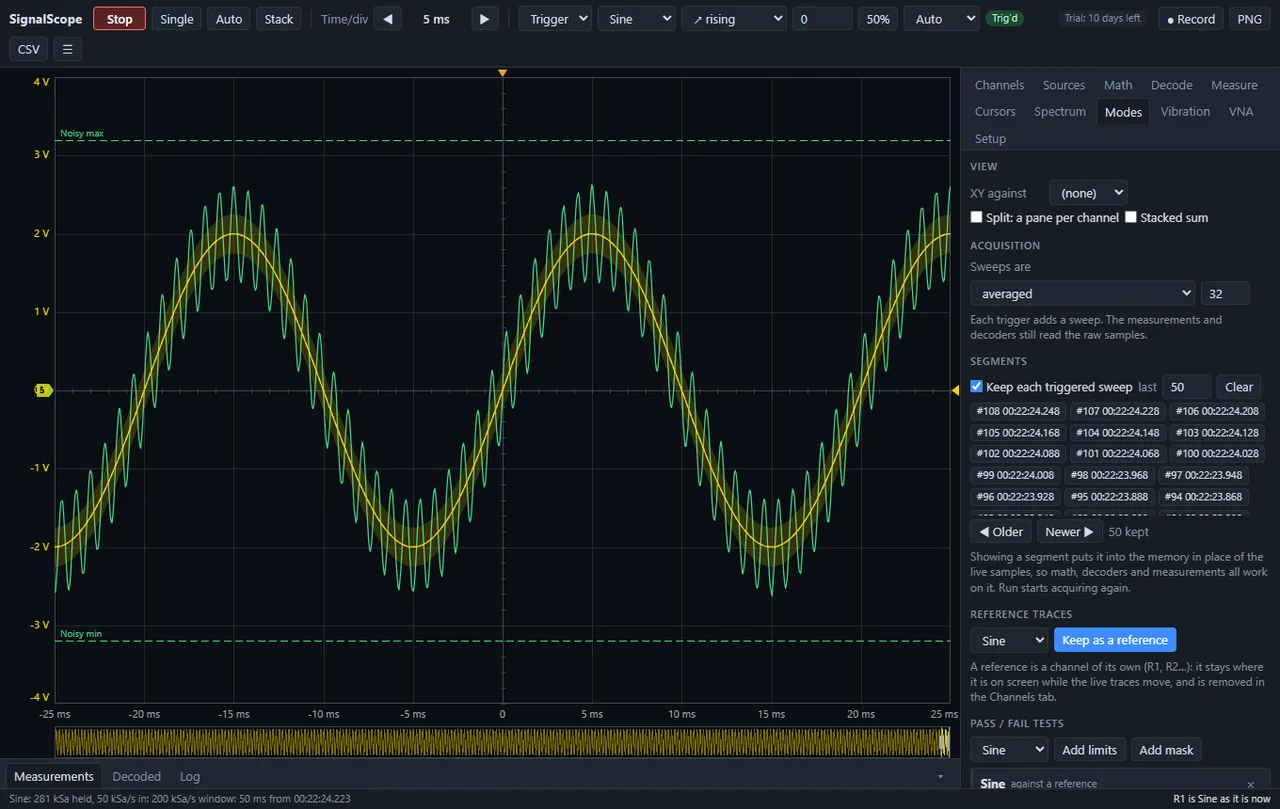
The modes a bench scope has. Sweeps averaged 32 deep, with the measurements and decoders still reading the raw samples rather than the average. Every triggered sweep kept - fifty of them here, listed by number and timestamp - and showing one puts it in place of the live samples so maths, decoders and measurements all run on it. Above that, a reference trace held while the live ones move, and pass/fail against limits or a mask.
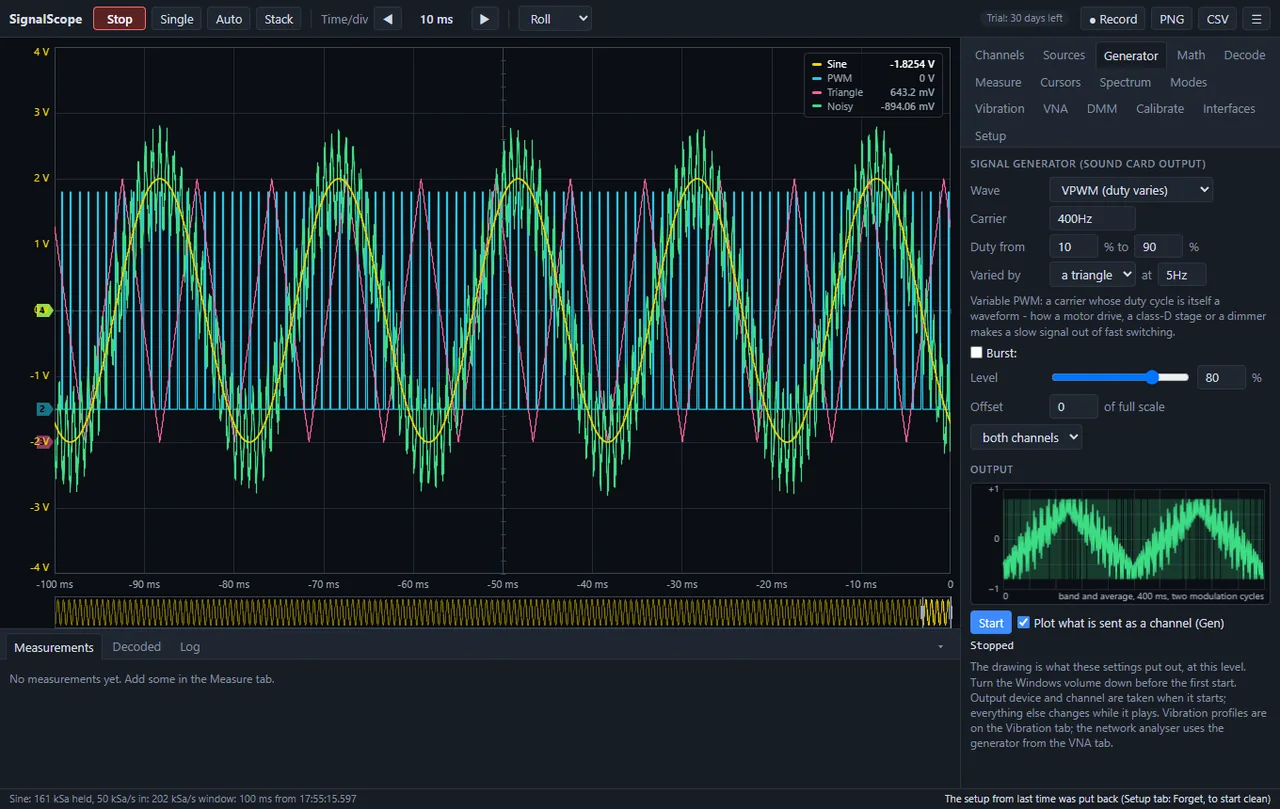
The signal generator, which is the sound card's output. This is variable PWM: a 400 Hz carrier whose duty is swept from 10 to 90 % by a triangle at 5 Hz - how a motor drive, a class-D stage or a dimmer makes a slow signal out of fast switching. The preview at the bottom right shows what is really being sent, and the note above the Start button says to turn the Windows volume down before the first one.
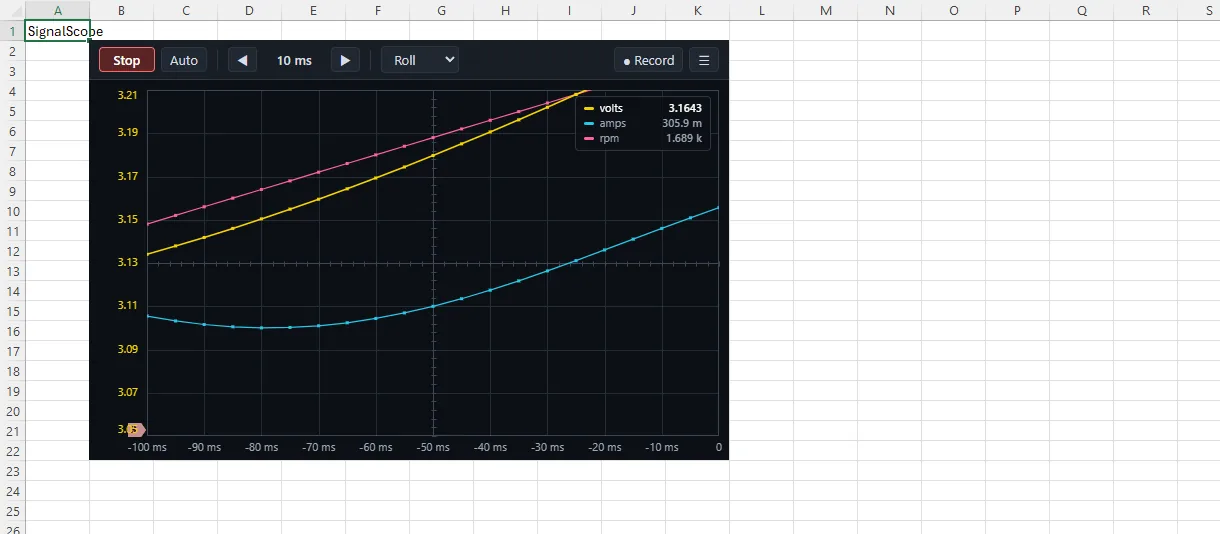
The same scope inside an Excel worksheet, rolling volts, amps and rpm over the cells. Not a picture pasted into a sheet - it is the application running there, which is what makes a live trace something you can put beside the numbers it came from.

Worth knowingThe Excel content add-in is written but has not yet been tried inside Excel. Everything else runs.

On video

Ten recordings of it actually running.

Screens of a program that moves are only half of it, so here it is moving. The real scope page served by the application itself, on its demonstration signals - recorded by its own tool. These ten are the heaviest films in the family, because a trace is fine detail that changes every frame, so they are the one set here re-encoded to 1440 wide: a decoded CAN frame and the measurement table still read, and ten clips cost 30 MB instead of 73. Nothing plays until you press it.

14 s Four live channels triggered on the sine with five measurements counting underneath; cursors come on, and the timebase zooms in.
14 s One capture, six buses decoded on their own lanes and listed in the table - UART, I2C, SPI, CAN, SENT and PWM - then a zoom into a single CAN frame and the signals inside it, and back out again.
12 s The spectrum of the noisy channel with its five peaks found, marked and listed - and the frequency axis turning logarithmic half way through.
10 s Two channels that are arithmetic rather than inputs: lowpass(Noisy, 200), and Noisy minus Clean beside the original - the filter, and exactly what it took away.
16 s The generator drawing its own output before it plays any of it: sine, PWM at 25 then 70 per cent, voltage-controlled PWM, a logarithmic sweep and a staircase.
12 s A 6.5-digit multimeter on any channel, reading the sine as AC volts in the same terms a Keysight 34465A uses - then the display turning into a trend.
18 s The network analyser, simulated: an uncalibrated sweep, then the short, open and load standards measured in turn, then the corrected sweep drawn on the Smith chart.
12 s A reference trace saved as R1, a mask drawn around it, and the noisy channel tested against that mask with persistence on.
8 s Every channel in a pane of its own, with cursors - for when four traces stacked on one grid stop being readable.
24 s A bench session typed into a terminal: rename and couple a channel, set the trigger and the timebase, ask for measurements, run a generator sweep, query it back - and the scope following every line.

Getting started

What it looks like to actually use it.

You can try the whole thing before connecting anything - the demo sources generate real signals and real buses, so the scope has something to show on a machine with no hardware on it at all.

  1. 1

    Open it, and give it something to draw

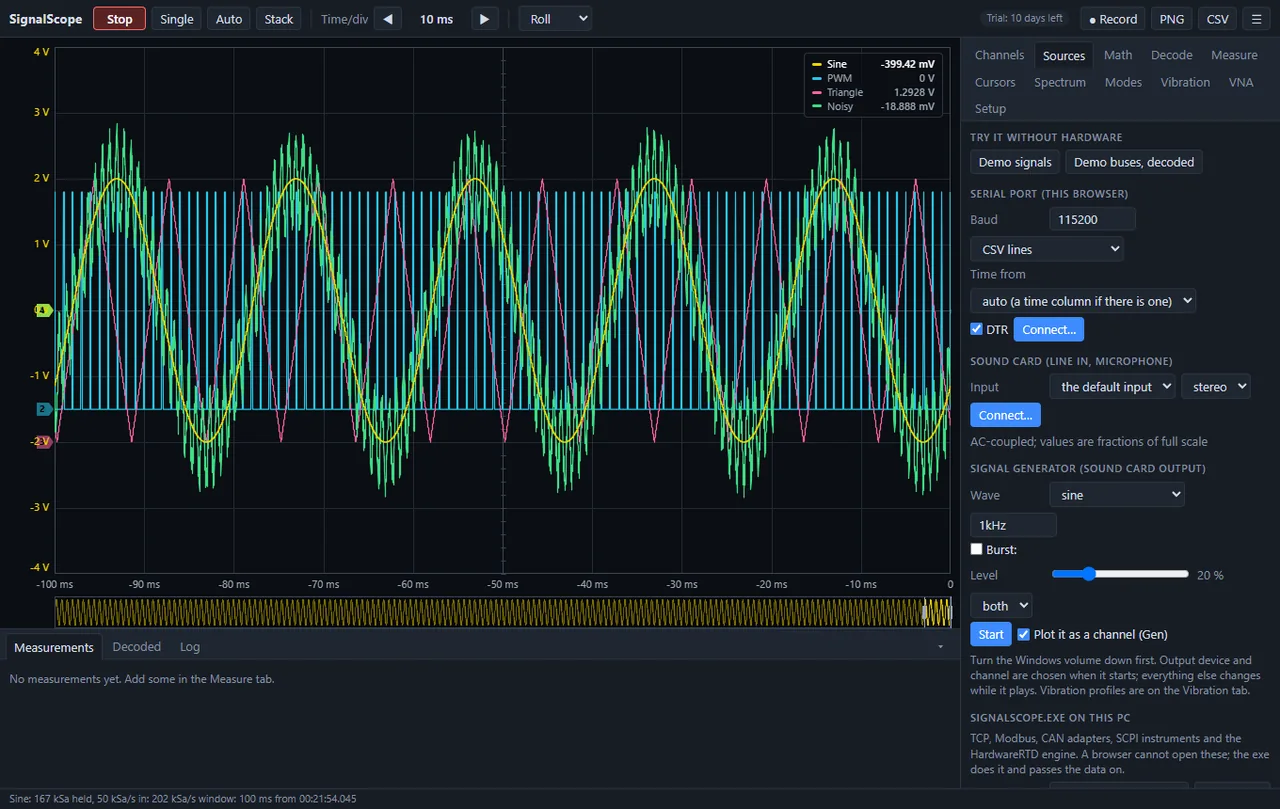
    The Sources tab lists every way numbers can get in. Top of the list is 'Try it without hardware' - Demo signals puts a sine, a PWM, a triangle and a noisy trace on the screen, which is what is drawn here. Below that, a serial port can be opened straight from the browser, a sound card line-in becomes two channels, and a built-in generator plays a tone out of the sound card while plotting it as a channel. TCP, Modbus, CAN and SCPI instruments need the Windows application rather than the browser, and the panel says so.
    Open it, and give it something to draw
  2. 2

    Decode the buses on top of the traces

    The Decode tab turns raw logic traces into protocol. Each decoder is added against named channels - UART needs a data line, its baud rate and framing; I2C needs SCL and SDA; SPI needs clock, MOSI and chip select. The decoded rows appear as ribbons beneath the traces and as a table underneath, so a byte on the chart and its value in the list are the same click. Here six buses are decoded at once and the UART is spelling out 'Hello'.

    Decode the buses on top of the traces

Get in touch

SignalScope is not a download. It is one of the tools the work is done with, installed and licensed when an engagement starts. Tell me what you are working on and I will tell you what it would do for it.

Or email mblab.technology@gmail.com. Your details are used to answer you and to follow up — nothing else.

Requirements

  • Windows 10 or 11, 64-bit
  • About 200 MB of disk
  • No .NET install needed — the runtime is bundled
  • No Excel needed — workbooks are written directly

Also in the set