Software — MbltHmi

MBLT HMI

Operator screens on a panel PC, or in any browser on the network.

Early release 0.1.0 MbltHmi — command line and desktop app

What it does

Draw the screens, bind them to PLC tags, try them on simulated values, and run them on a panel PC or in a browser. The runtime is the application itself - connections, tags, alarms, logging and users keep running with no screen open, and a page is only a client.

  • 67 widget types on a drawn canvas, with bindings and actions
  • Ten connection kinds, including MBLT PLC's tag link, Modbus TCP and RTU, MQTT, OPC UA, the MB Lab stream, a DataStreamerX device, a raw socket, HTTP and simulated values - every one of them two-way, because an operator screen that cannot write is a dashboard
  • The same OPC UA server as MBLT PLC, written from IEC 62541 rather than wrapped, so Node-RED, SCADA and any other OPC UA client can browse, read, write and subscribe to the tag table
  • The HardwareRTD engine as a connection in its own right - every device that engine owns, serial, TCP, Modbus, CAN and SCPI, on this PC through its pipe or from another PC over the network
  • Alarms, and logging to SQLite, SQL Server, ODBC or CSV behind a disk queue so nothing is lost when the database is away
  • Recipes, users and an audit trail - every write and ack checked in the runtime, not in the page
  • Imports an MBLT PLC project and tells you what is new, changed, renamed or gone
  • A 102-page manual
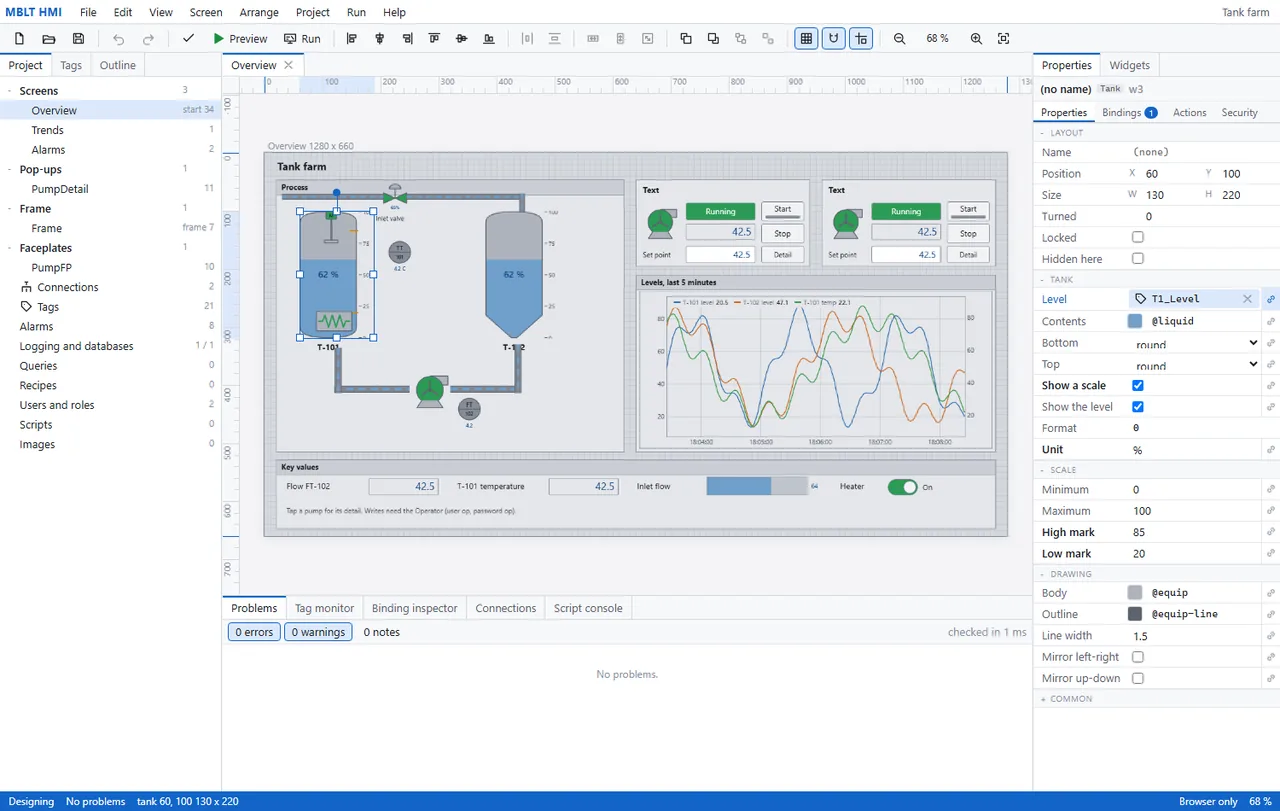
A tank farm overview being drawn: two tanks bound to live level tags, a trend of the last five minutes, and a key-values strip. The property grid on the right belongs to the selected tank - its level bound to T1_Level, its scale 0 to 100 % with high and low marks at 85 and 20. The project carries 21 tags, 8 alarms, two connections and two roles, and checks clean in 1 ms.
The same kind of project actually running, as an operator sees it: a packer with start and stop, a mode selector and a stack light, production counters, a sealer gauge and motor temperature, and a standing alarm banner at the top that will not go away until it is acknowledged. The recipe panel is the detail worth noticing - it shows the stored record beside what is actually in the PLC, and marks in orange the two values that do not match.
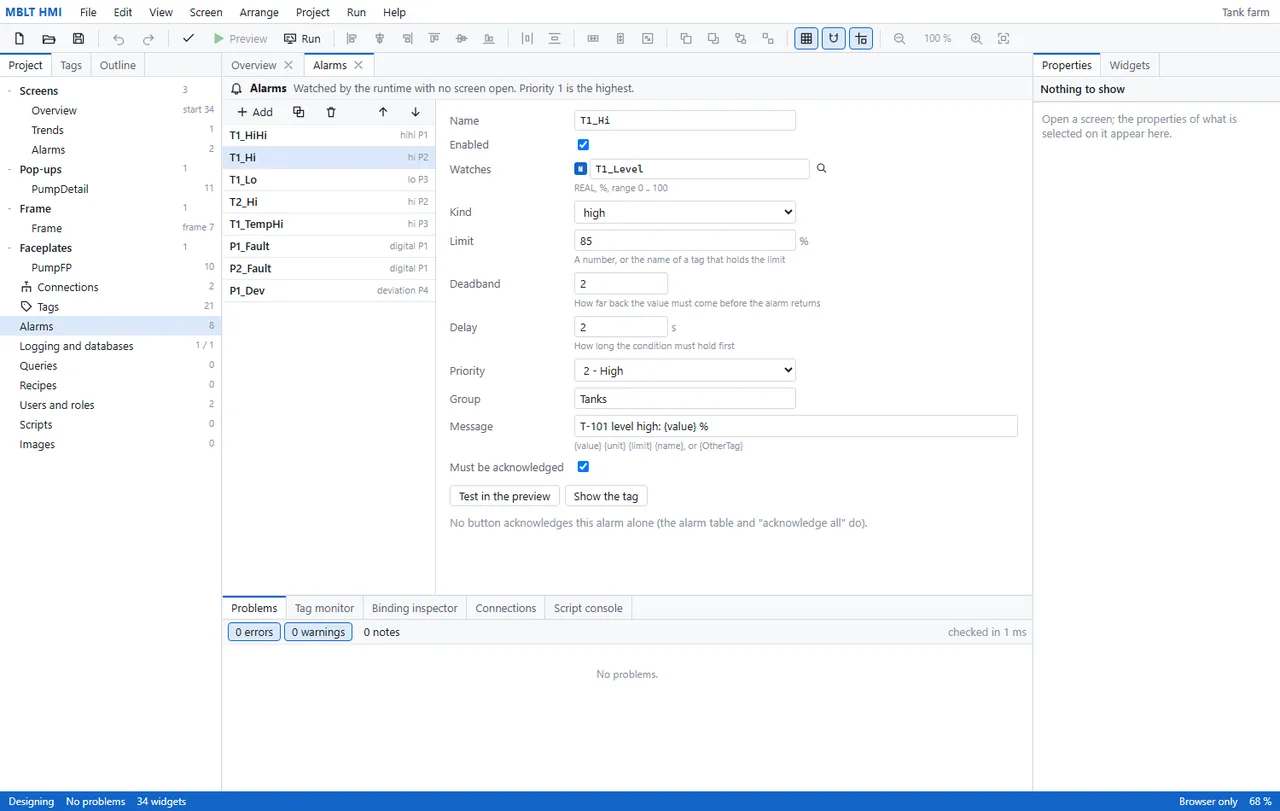
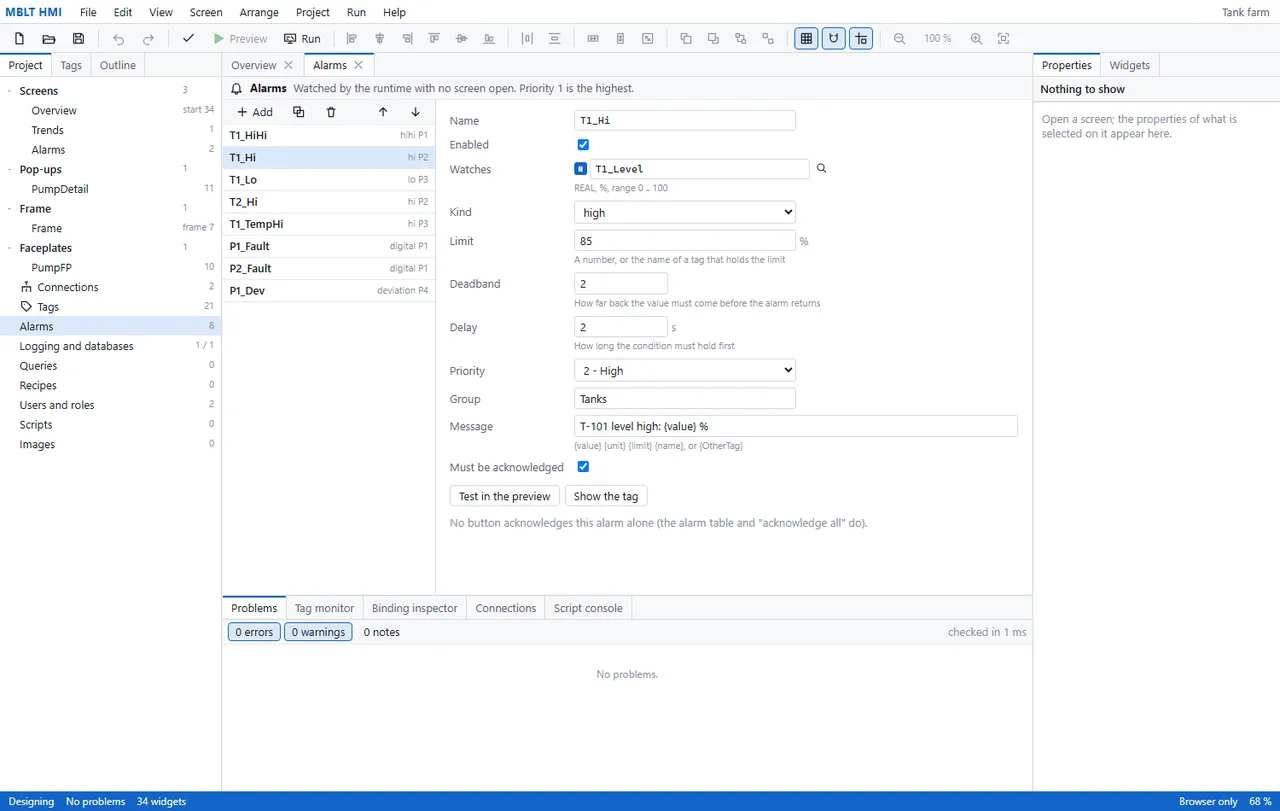
Eight alarms on one tank farm, and the two settings that separate a real alarm engine from a toy: a deadband, so the value must come back by 2 % before the alarm clears, and a delay, so a condition has to hold for two seconds before it is raised at all. The message takes substitutions, the priority and group drive the operator's list, and the header says plainly that the runtime watches these with no screen open.
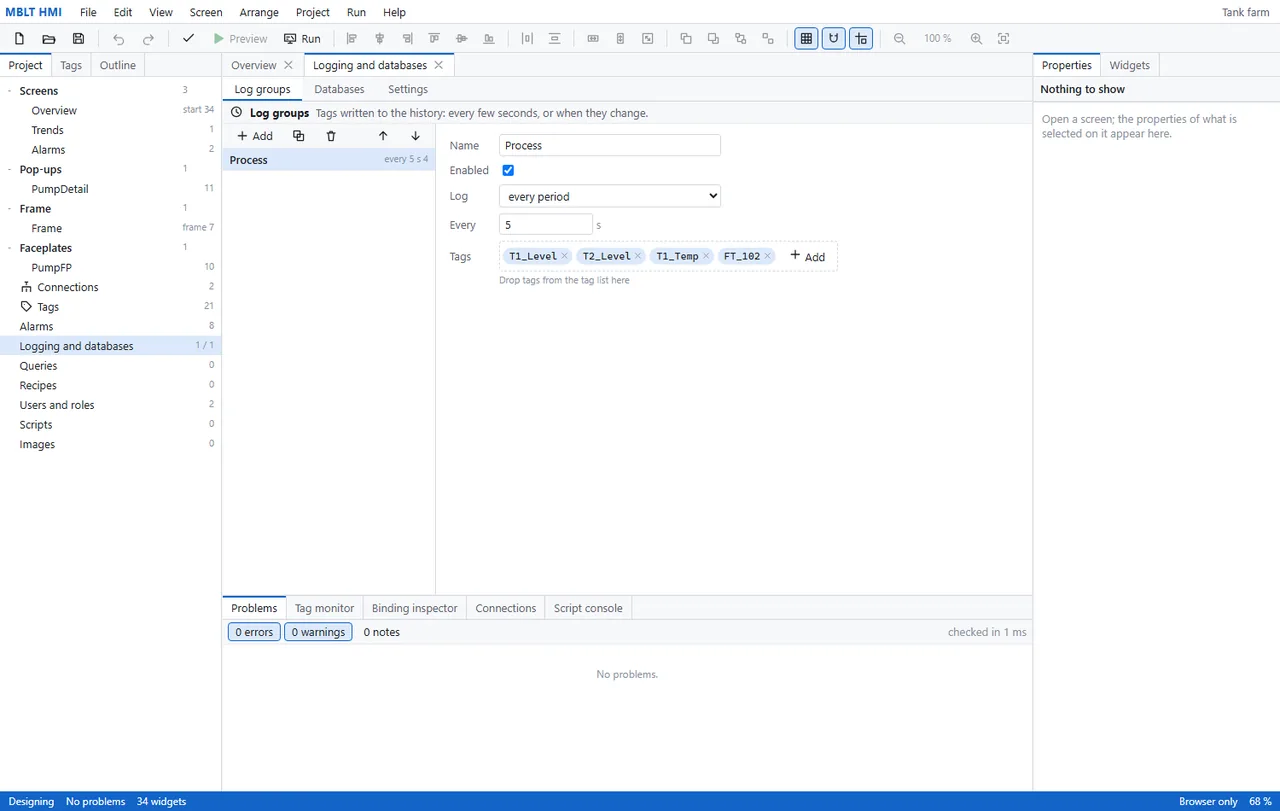
A log group: four tags written to history every five seconds, or on change. Logging and the databases behind it live in the runtime rather than the page, and go to SQLite, SQL Server, ODBC or CSV behind a disk queue - so a database that goes away for an hour costs you the hour's latency, not the hour's data.
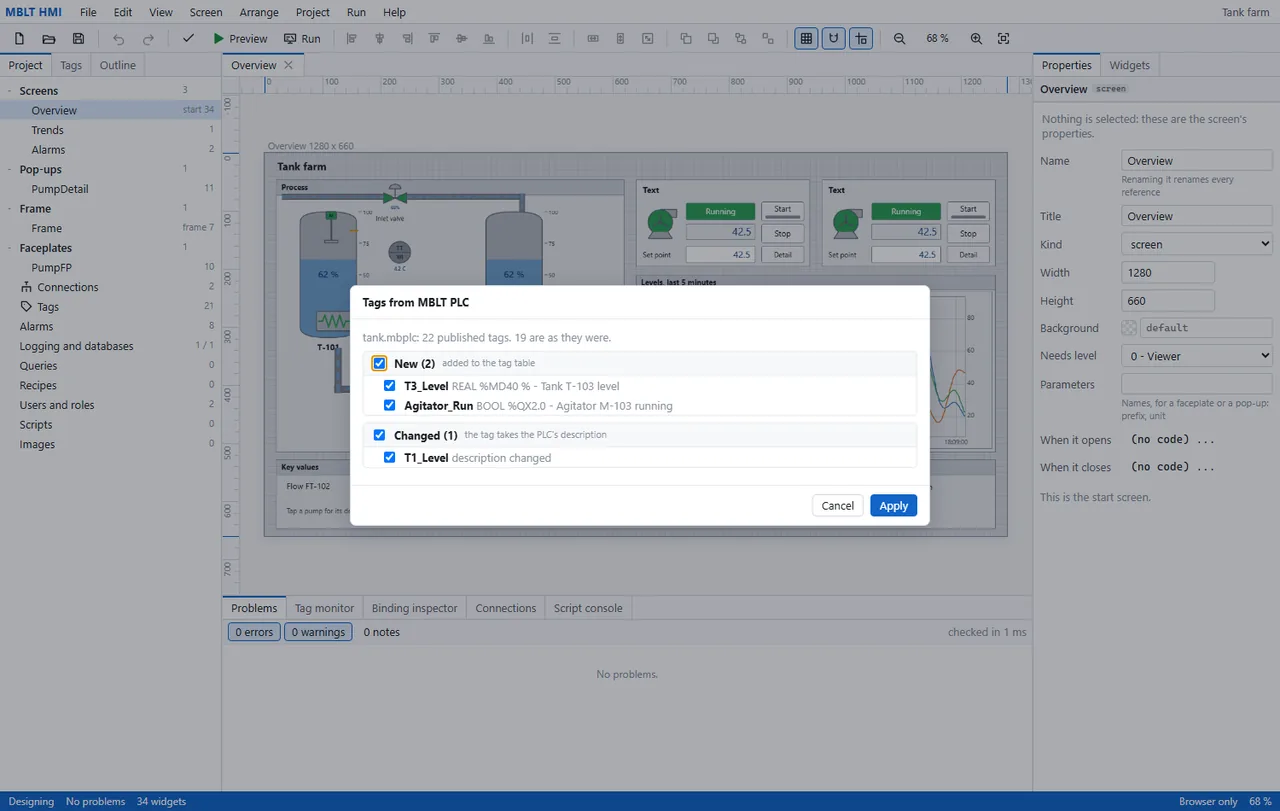
Importing the tags from an MBLT PLC project, with a diff rather than a blind overwrite: 22 published tags, 19 unchanged, two new ones with their PLC addresses and descriptions, and one whose description changed. Each is a checkbox, so the import is yours to approve rather than something that happens to your tag table.
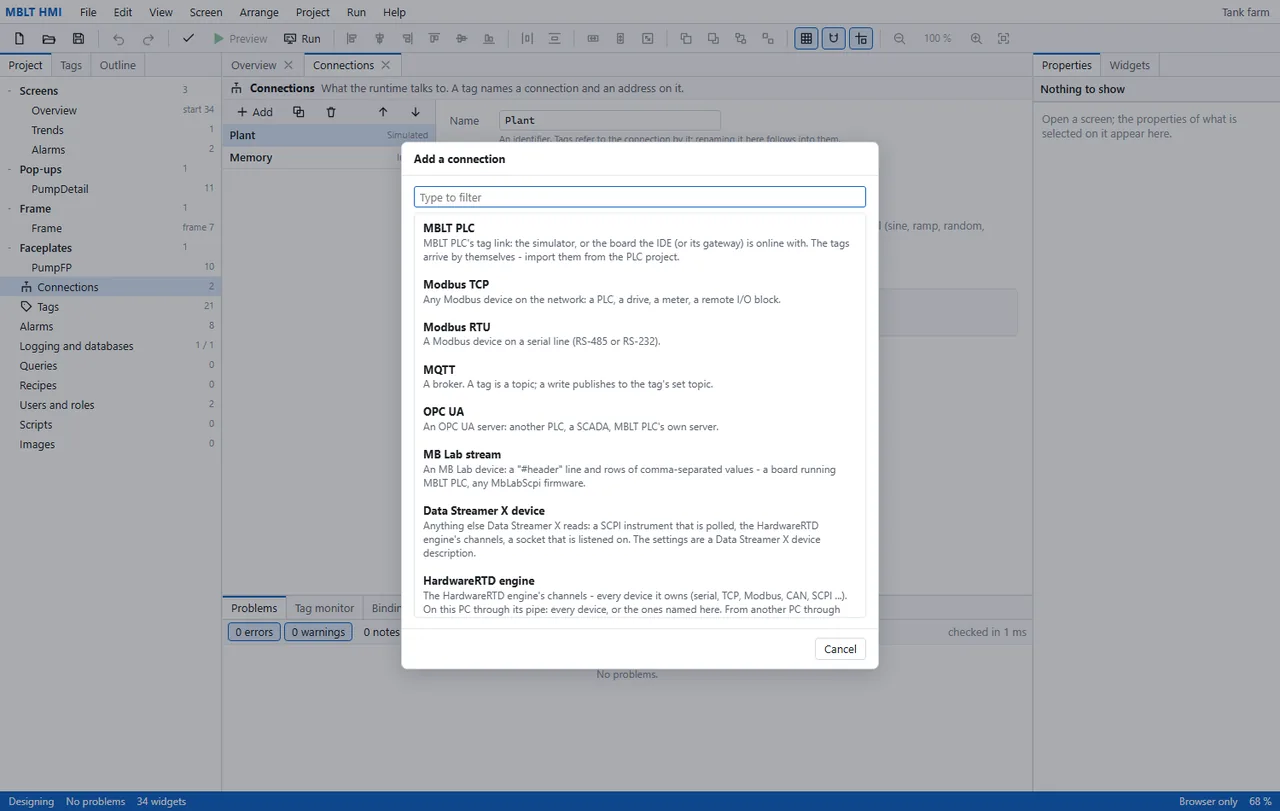
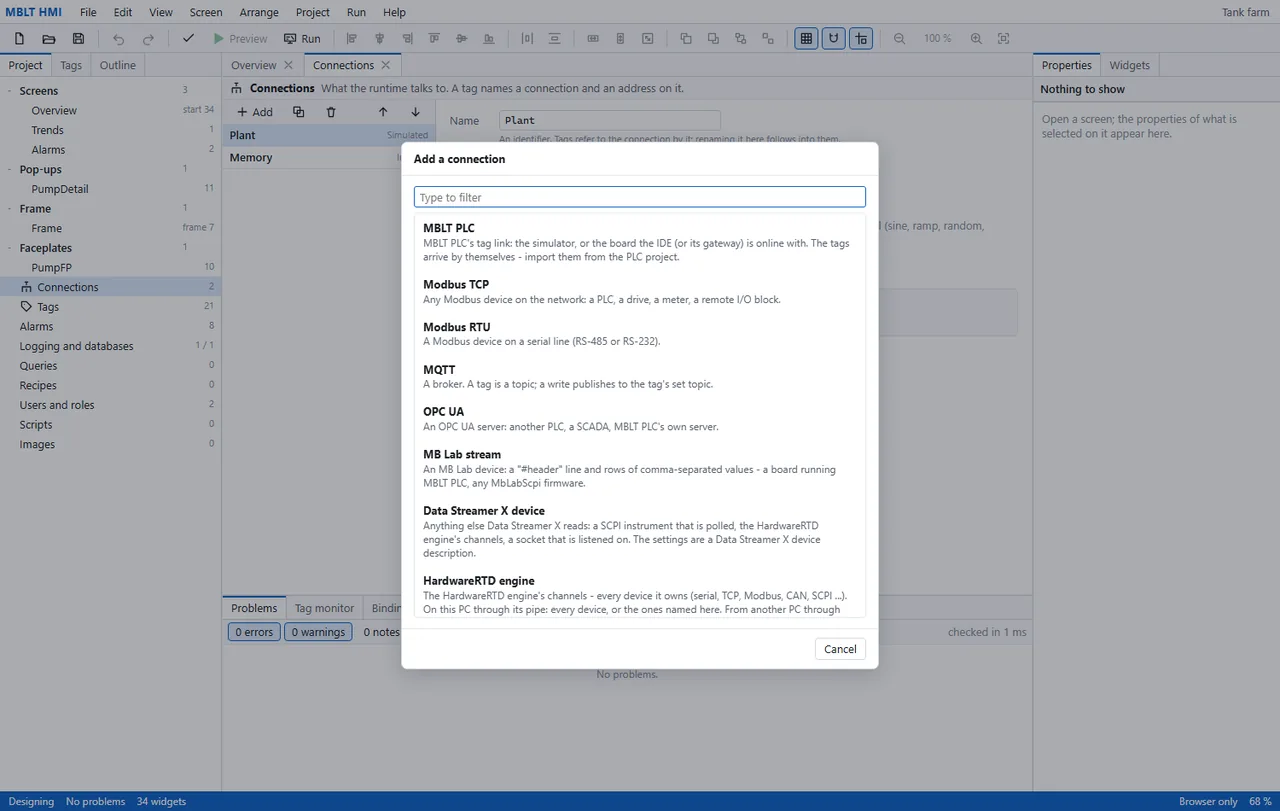
The connection kinds, in the application's own words. MBLT PLC's tag link, Modbus on the network and on a serial line, an MQTT broker, an OPC UA server, the MB Lab stream, a DataStreamerX device - and the HardwareRTD engine, which brings in every device that engine owns: serial, TCP, Modbus, CAN and SCPI, from this PC or from another one.
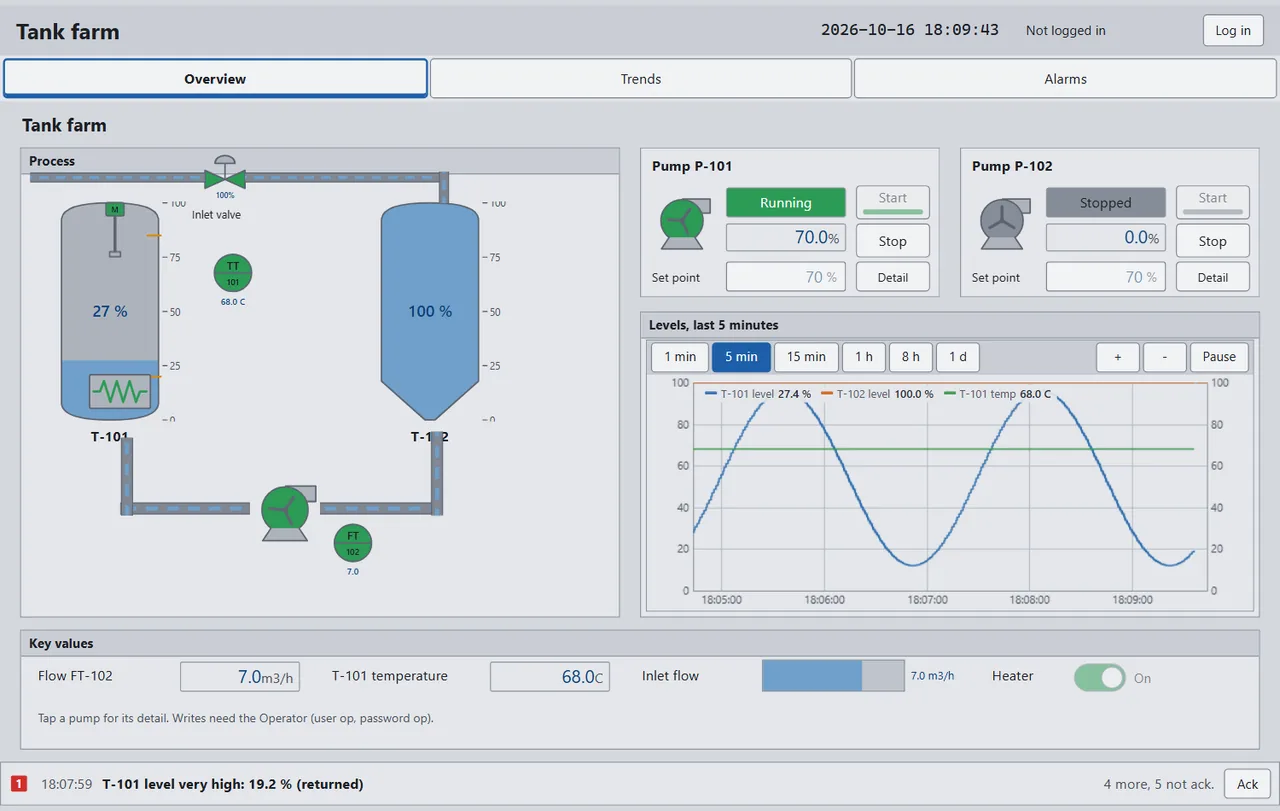
The operator screen as an operator sees it: a tank farm with the mimic live, two pump faceplates, a trend switchable from one minute to one day, and the alarm banner along the bottom with five still unacknowledged. It says 'Not logged in' in the corner and 'writes need the Operator' under the mimic, which is the part that matters - a screen that can write is a screen that needs to know who is writing.
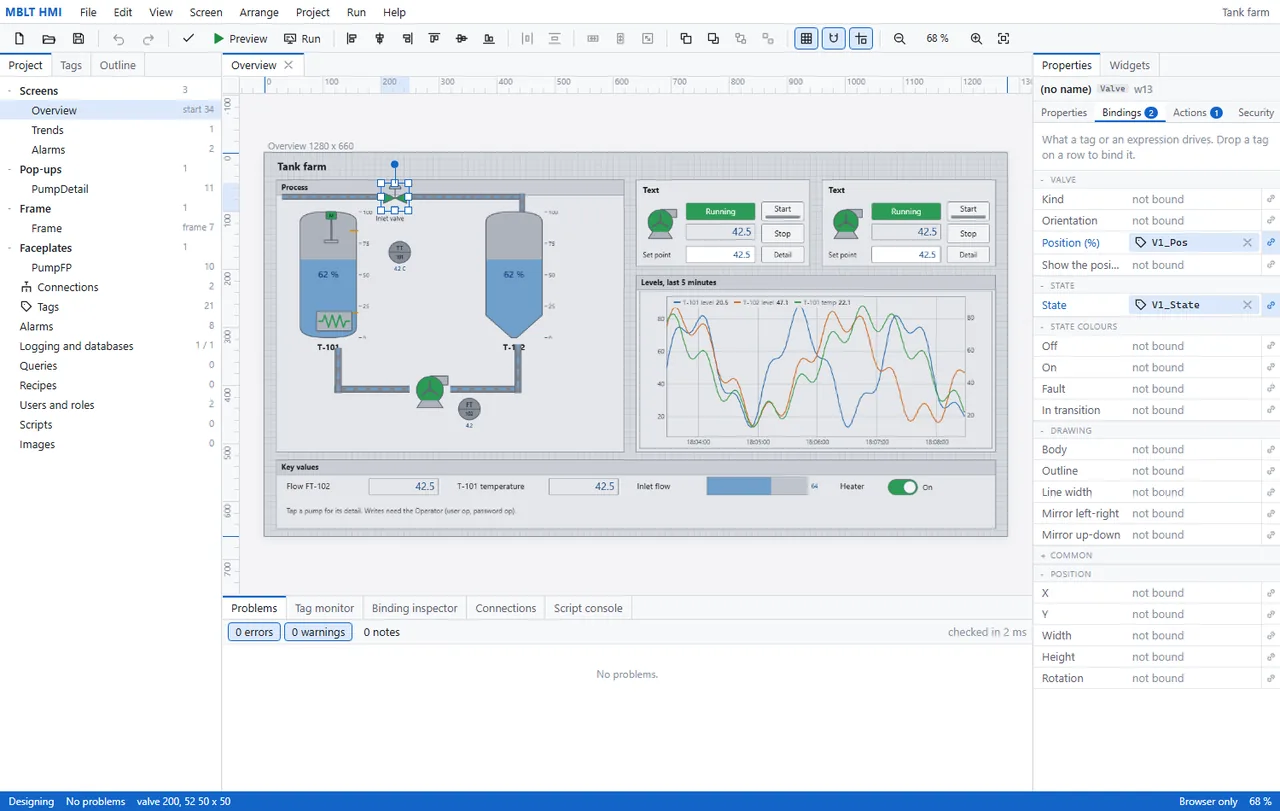
The same screen being drawn. A valve is selected and its properties are on the right, each one a row you can drop a tag onto - position bound to V1_Pos, state to V1_State, and everything else still unbound. That is the whole idea: the drawing is not a picture of a plant, it is a set of properties wired to tags. Checked in 2 ms, no errors, no warnings.

Worth knowingPre-1.0. Every driver has been checked against a peer, but no serial port was opened on this machine, so Modbus RTU and the stream and socket drivers over a COM port are untried.

On video

Seven recordings of it actually running.

Screens of a program that moves are only half of it, so here it is moving. The real designer and the real runtime, on the examples that ship with it. Every panel is bound to tags and driven by the simulated runtime, so what moves is what the tags did. Nothing plays until you press it.

14 s Start is pressed: the belt runs, every box is counted, and a tall one opens the reject gate - the same tags as the ladder program in MBLT PLC, on a CANADUINO MEGA2560.
14 s Rain. The inflow rises, the sump fills, and at the start level the lead pump cuts in - duty and standby, so next time the other one leads.
10 s The same station in the Industrial skin. Six skins ship, flat or raised, and none of them is a redraw - it is one setting.
14 s A batch starts: the inlet opens and the tank fills, with the step read from the outputs rather than from a label.
10 s A tank farm running: pumps turning, levels moving, the trend drawing itself as it goes.
10 s Heater, fan, roof vent and mister on the greenhouse panel, in the Blue skin - navy with white and yellow lettering.
9 s The same running panel, at the same moment, turning from ISA-101 flat to raised four seconds in. One setting, not a second screen.

Getting started

What it looks like to actually use it.

Four steps from a PLC project to an operator screen running on simulated values. No panel, no plant, and no typing the tag list twice.

  1. 1

    Take the tags from the PLC project

    It opens the MBLT PLC project and reconciles the tag table against it: twenty-two published tags, nineteen exactly as they were, two new ones with their addresses and descriptions, and one whose description changed in the PLC and should change here. Every line has a tick, so you take what you want. This is the step that stops an HMI drifting away from the controller it is supposed to be showing.

    Take the tags from the PLC project
  2. 2

    Let it draw the commissioning screen

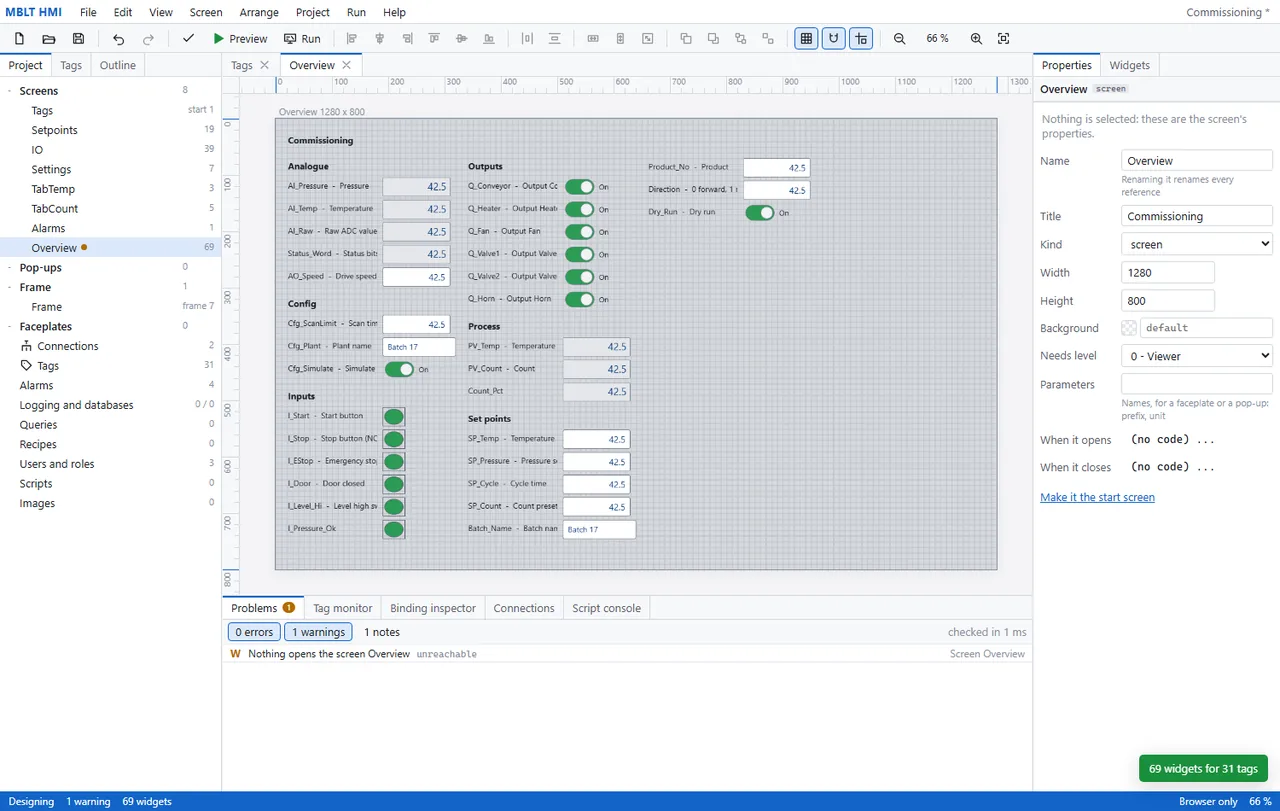
    Sixty-nine widgets for thirty-one tags, generated - analogue inputs as numeric fields, outputs as switches, digital inputs as lamps, set points as editable boxes, each with the tag's own description beside it. Not a screen for an operator, a screen for the week you are commissioning, when what you need is every tag in one place. The warning at the bottom is already doing its job: nothing opens this screen yet, so it is unreachable.
    Let it draw the commissioning screen
  3. 3

    Bind a property, and test it before anything runs

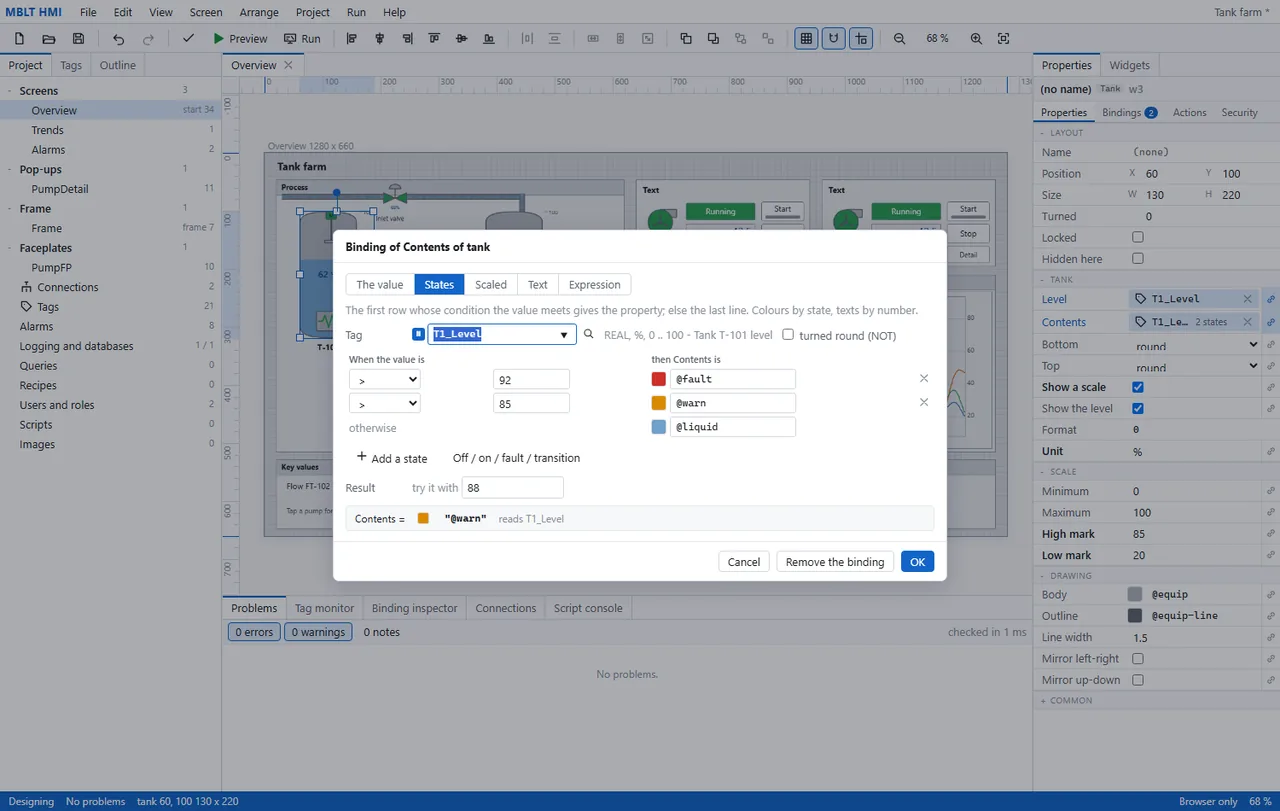
    The tank's fill colour bound to T1_Level by state: above 92 % it is the fault colour, above 85 % the warning one, otherwise the liquid colour. The row underneath is the part worth having - type a value, here 88, and it tells you the binding resolves to the warning colour, before any plant or simulator is involved.
    Bind a property, and test it before anything runs
  4. 4

    Preview it on simulated values

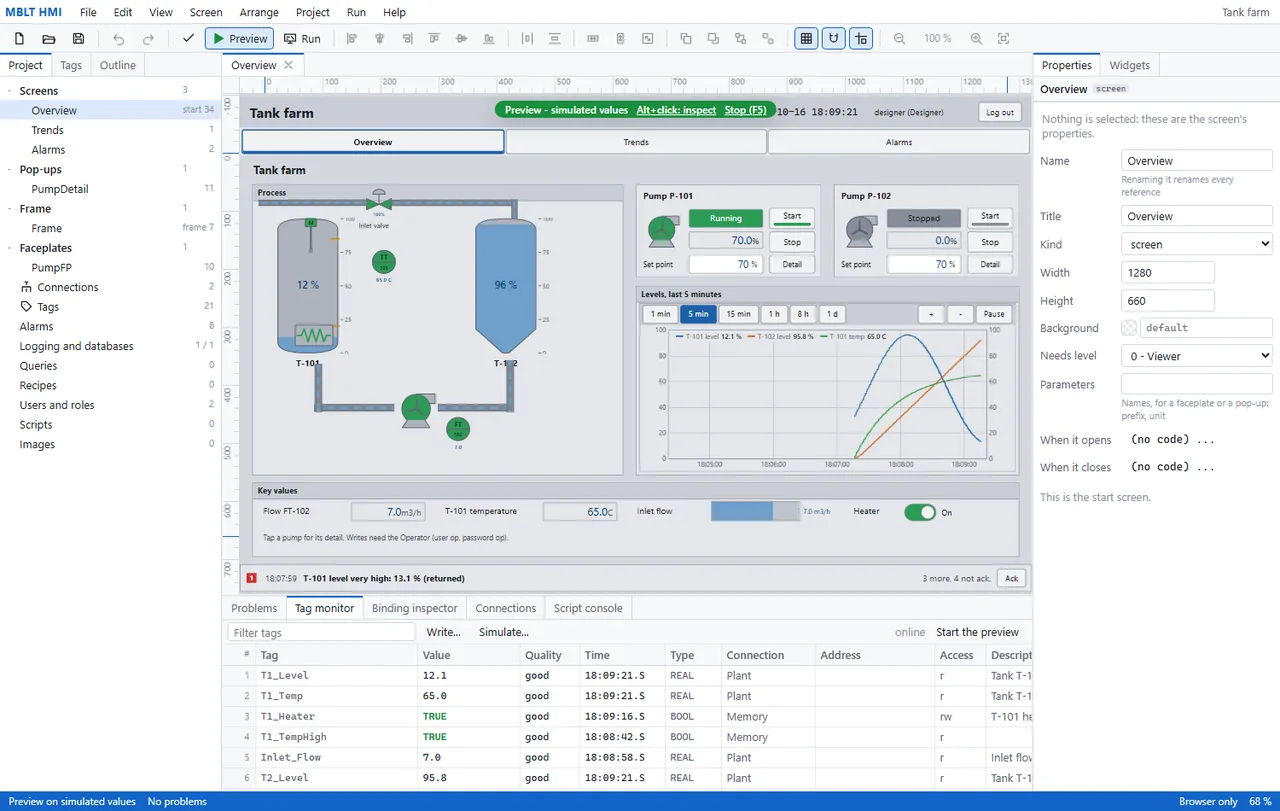
    Preview runs the screen inside the designer on simulated values, with alt-click to inspect any widget and F5 to stop. The tag monitor underneath is the honest view: every tag with its value, its quality, the time it last changed, which connection it came from and whether this screen may write to it. The alarm banner is live too, with four still unacknowledged.
    Preview it on simulated values

Making it a station

The four things that decide whether it can go on a machine.

A screen that reads a simulator is a drawing. These are the parts that make it something an operator can be given: what it talks to, what it watches when nobody is looking, where the record goes, and who may touch it.

  1. 1

    Point it at something real

    A tag names a connection and an address on it, and this is the list of what a connection can be. MBLT PLC's own tag link, where the tags arrive by themselves. Modbus TCP for a drive, a meter or a remote I/O block, and Modbus RTU for the same thing on RS-485. MQTT, where a tag is a topic and a write publishes to its set topic. OPC UA, for another PLC or a SCADA. And three that are MB Lab's own - the stream a board emits, a DataStreamerX device, or the whole HardwareRTD engine with every device it owns, over a pipe on this PC or a socket from another.
    Point it at something real
  2. 2

    Say what counts as wrong

    Eight alarms on this project, and the line at the top is the one that matters: they are watched by the runtime with no screen open. An alarm names a tag, a kind - high, low, deviation, digital - a limit that can itself be a tag, and then the two settings that separate an alarm system from a threshold: a deadband, how far back the value must come before it clears, and a delay, how long the condition must hold before it counts at all. The message takes the value, the unit, the limit or another tag by name.
    Say what counts as wrong
  3. 3

    Decide who is allowed to touch it

    A packing machine at runtime, and the thing to look at is what is greyed out. Nobody is logged in, so reset, simulate fault, the set point, acknowledging an alarm and every recipe button are all disabled - the screen reads perfectly well and writes nothing. The recipe table underneath is doing its own quiet job: the stored record beside what is actually in the PLC, with the two that differ picked out in amber.

    Decide who is allowed to touch it
  4. 4

    Keep the record

    Logged values, alarms and the audit trail, written to SQLite in a file beside the project - and the note says it needs nothing installed, because Windows already has SQLite. The logger makes its own tables: tag_log, alarm_log, audit_log. The last clause is the one earned on a plant floor - while the database cannot be reached, it queues on disk rather than dropping what happened.

    Keep the record

Get in touch

MBLT HMI is not a download. It is one of the tools the work is done with, installed and licensed when an engagement starts. Tell me what you are working on and I will tell you what it would do for it.

Or email mblab.technology@gmail.com. Your details are used to answer you and to follow up — nothing else.

Requirements

  • Windows 10 or 11, 64-bit
  • About 200 MB of disk
  • No .NET install needed — the runtime is bundled
  • No Excel needed — workbooks are written directly

Also in the set